
Automated Invoice Processing

Managing and processing invoices manually can be time-consuming and error prone. Our AI-powered Automated Invoice Processing simplifies the entire workflow—from email-based invoice intake to Salesforce integration, reporting, and error handling—ensuring timely updates, data accuracy, and daily insights, without any manual intervention.

How it works

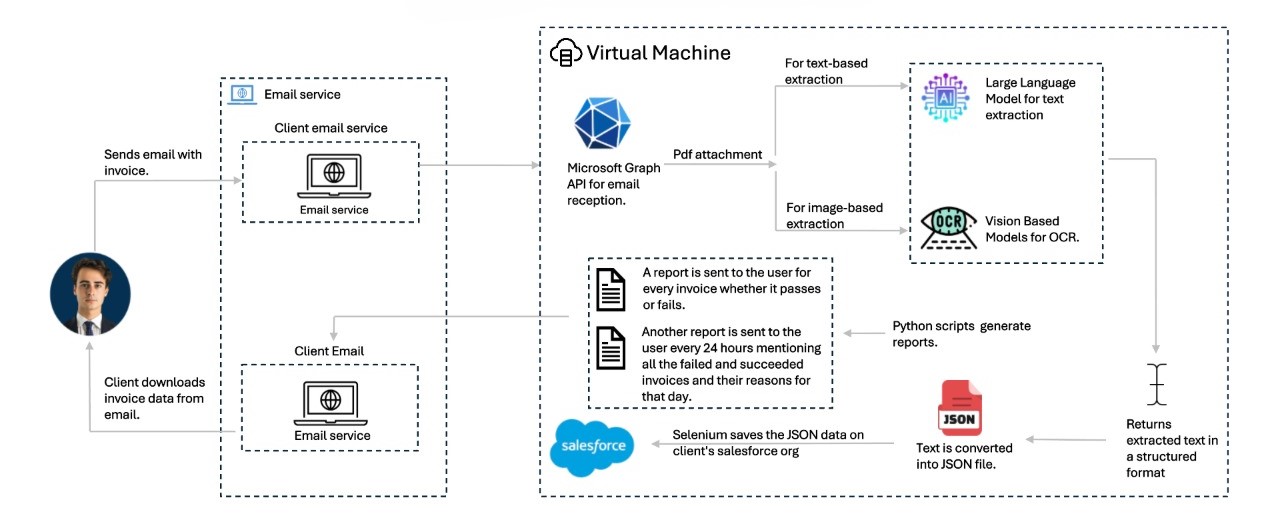
  • Email-Based Automation: The system detects and processes invoices received via email, extracting key details using AI-based document intelligence.
  • Fault-Tolerant Data Validation: To maximize accuracy and reduce errors, our invoice processing platform now incorporates a fault-tolerant mechanism. The system automatically validates extracted data against the original invoice before pushing it into Salesforce. If discrepancies are detected, the invoice is intelligently flagged for manual review—ensuring only accurate data is processed while maintaining seamless workflow continuity.
  • Salesforce Integration: Extracted data is automatically populated into Salesforce for seamless record management.
  • Screenshot Logging for Traceability: To enhance transparency and accuracy, our system now captures automated screenshots at key stages—when data is entered into the CRM and again after it is saved. This ensures a reliable audit trail, simplifies discrepancy resolution, and reinforces the integrity of the entire invoice processing workflow.
  • Real-Time Confirmation: A confirmation report is emailed to the sender upon successful processing. If issues are found, a detailed exception report is generated.
  • Excel Upload Portal for Error Handling: Users receive an error-flagged Excel file for partially failed invoices, make corrections directly in it, and upload the sheet via the portal by entering the invoice type, subject line, and email address. The system processes the corrected data, updates Salesforce, and emails a post-processing summary with success and error details.
  • Credential-Protected Access: Access to the platform is secured through a login portal requiring verified credentials—ensuring only authorized users can submit or correct invoices, enhancing data protection and compliance.
  • Daily Summary Report: A consolidated report is automatically generated every 24 hours, summarizing all processed invoices.
Introducing

Use Case
  • Finance & Accounting Teams – Automate invoice entry, reduce manual work, and ensure timely approvals.
  • E-commerce & Retail Companies – Quickly process large volumes of supplier invoices and streamline payment cycles.
  • Small & Medium Businesses (SMBs) – Simplify invoice handling and reduce operational costs without expanding the team.
  • Service Providers & Agencies – Automate client billing processes and share clear, timely invoice reports.
  • Manufacturing & Logistics – Efficiently process invoices from vendors and ensure alignment with delivery schedules.
Benefits
  • 85% Faster Invoice Processing – Speeds up your billing cycles with email-based automation.
  • 95%+ Accuracy in Data Extraction – Ensures reliable and precise invoice data.
  • 80% Reduction in Manual Effort – Frees up teams from repetitive data entry.
  • Real-Time Confirmation Reports – Instant feedback on each invoice’s processing status.
  • Automatic Error Detection – Detects and reports missing or unmatched data fields.
  • 24-Hour Consolidated Summary – Provides a complete daily overview of invoice operations.
  • Excel Upload Portal for Error Correction – Enables quick correction and reprocessing of flagged invoices without re-entering all data manually.

Components

  • Email-Based Invoice reception — enables easy, frictionless invoice submission without portals or logins. Just send an email.
  • AI-Powered Data Extraction Engine — extracts structured data from invoices with over 99% accuracy using document AI.
  • Salesforce Sync Module — ensuring seamless, real-time syncing of extracted data to Salesforce.
  • Real-Time Confirmation Engine Closes the loop — immediately informs the user of successful processing via a confirmation email and report.
  • Exception Reporting System – Detects missing data or Salesforce update failures and sends detailed reports for quick resolution.

Architecture Diagram

Live Demo

Please fill the form

Preview
Mute
Book Demo

Let's talk

If you want to get a free consultation without any obligations, fill in the form below and we'll get in touch with you.


    By providing a telephone number and submitting this form you are consenting to be contacted by SMS text message. Message & data rates may apply. Message frequency may vary. Privacy Policy Reply Help for more information. You can reply STOP to opt-out of further messaging.